I've been doing some detective work.
It started when candidates began emailing my team about Ava Labs interviews we'd never heard of. With Ava Labs recruiters we'd never hired.
They all told a similar story. A friendly recruiter on LinkedIn. A decent sounding role. A couple of rounds of chat. Then a link to a video interview. The moment they turned their camera on, a box popped up saying their video driver was broken, with a handy button to fix it.
The button installed malware.
So I went down a very deep rabbit hole of threat intelligence reports (my YouTube recommendations are now exclusively men in hoodies ).
What I found was a whole criminal industry using recruitment as its way in. Fake recruiters scamming candidates. Fake candidates scamming companies. And our hiring processes sitting right in the middle of it.
So let's ask the question.
Who's really in your hiring process?
There's a list of practical stuff you can do at the bottom, so stick around….
1. What I found down the rabbit hole
The driver trick has a name. Security researchers call it ClickFake Interview. Sekoia linked it to North Korea's Lazarus Group and found 184 fake job sites running it. It goes after people in crypto, and engineers, marketers, finance and BD folk have all been caught.
The engineer version is a take-home coding test with malware hidden inside. You run the project and the malware runs with it. One version hid it inside SVG pictures of country flags. diabolical.
Then there are the long cons. Several interviews. A skills test on a site built to look like a real assessment platform. An offer letter. An onboarding portal. And finally a request for bank details, ID and tax info "for payroll". Some send a cheque for your home office kit and ask you to pay their "approved supplier". The cheque bounces a week later, long after your money has gone.
And it's growing fast. Job scam losses reported to the FBI went from $70m in 2023 to $363m in 2025. Here in the UK, job scam reports to Action Fraud more than doubled between 2022 and 2024.
It runs the other way too. Gartner surveyed 3,000 candidates and 6% admitted to interview fraud, either pretending to be someone else or getting someone else to sit the interview. Palo Alto Networks found someone with no technical skills could build a deepfake candidate in about 70 minutes. That's shorter than most of my intake meetings.
2. Recruiter scams: what to look out for
Signs someone is recruiting in your name:
- Candidates asking about interviews or roles you don't recognise
- LinkedIn profiles claiming to be in your team that you've never met
- Job ads for your company on sites you don't post to
- Email addresses that look like yours but aren't (yourcompany-careers.com, that kind of thing)
- Candidates mentioning interview or assessment tools you don't use
3. Candidate scams: what to look out for
Signs the person in front of you isn't who they say they are:
- Lips slightly out of sync with their voice on video
- Reluctance to turn the camera on, or a background that's a bit too perfect
- Word perfect answers that arrive after a strange pause
- Work history you can't confirm with the actual employer
- References who can only be reached on Telegram or WhatsApp
- Asking for the work laptop to go to a different address from the one on their ID
4. What you can actually do
- Publish your real recruiters. Put a notice on your careers page and job ads listing every real recruiter by name, with a link to their LinkedIn, plus your email domain and the tools you use. If a candidate can't find their recruiter on that list, they know to check with you.
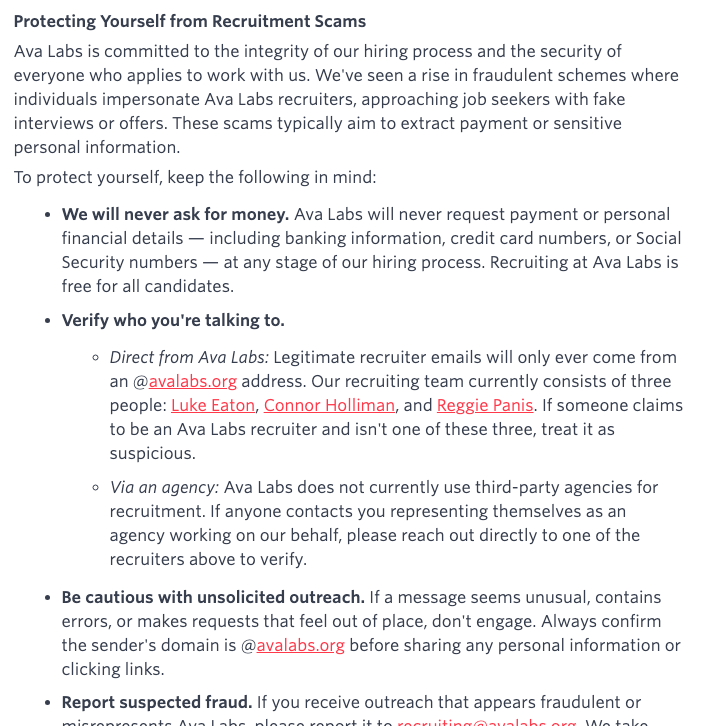
- Sweep LinkedIn every month. Search your company for people with recruiter titles and report anyone you don't know. If your company page is verified, admins can now remove people falsely claiming to work there. LinkedIn also asks anyone with a recruiter title to verify their workplace, so get your whole team verified.
- Give candidates a safety doc. One page, sent with your first message. What goes in it is below.
- Log every report. Date, platform, fake profile or domain, role advertised, how far the candidate got. A couple of months in, you'll see which roles get copied and where. Take that to your security team.
- Make sure your own process doesn't look like a scam. No take-homes sent as zip files. No tools nobody's heard of. No bank details before the offer is signed.
- Check candidates at the right moments. ID check before offer and again on day one. Employment history confirmed with the employer directly. The laptop goes to the address on their ID.
5. What to put in your candidate safety doc
Keep it to one page:
- Who our recruiters are, with links to their profiles
- The only email domain we use
- The tools we use for interviews and tests
- We will never ask you to install software or paste a command to join an interview
- We will never ask you to pay for anything, buy equipment or deposit a cheque
- We only ask for bank details and ID after you've signed an offer, through our onboarding system
- How to contact us if something feels off
- Where to report a scam (UK: Action Fraud on 0300 123 2040, or Police Scotland on 101. US: ic3.gov)
Send it with your first outreach and link it in every calendar invite.
TL;DR - Who's really in your hiring process?
Who the hell knows is the honest answer.
Scammers are pretending to be your recruiters, and some of your candidates might not be who they say they are either.
You won't stop all of it. What you can do is make it much easier for candidates to spot a fake, and much harder for a fake to get through. Publish your real team, sweep LinkedIn, give candidates a safety doc, and log what you see.
And if a recruiter ever asks you to fix your video driver… it wasn't me.
Well... that's issue Eighty Four! If you have any questions about it, or any feedback on this issue of The Data Driven Recruiter, grab me on LinkedIn for a chat.
I'll see you next week!